
How to Get More LinkedIn Engagement: 15 Proven Strategies
LinkedIn engagement plays an important role in building professional visibility, attracting potential clients, and growing your network. However, getting likes, comments, and shares isn’t always easy. You might publish useful posts regularly but still struggle to reach the right audience.
The solution isn’t simply to post more often. You need a clear content strategy that connects with your audience and encourages meaningful conversations. From writing stronger hooks to choosing effective content formats, small improvements can make your posts more valuable.
This guide explains how to get more LinkedIn engagement through 15 practical strategies. You’ll also learn how to improve post visibility, measure engagement rates, avoid common mistakes, and turn professional interactions into business opportunities.
What Is LinkedIn Engagement?
LinkedIn engagement refers to the interactions people have with your content, profile, or company page. These actions help you understand whether your content attracts attention and encourages professional conversations.
For example, someone might like your post about digital marketing. Another person might comment with a question or share your advice with their network. Both actions represent engagement.
However, engagement includes more than visible reactions. People can also save your posts, send them privately, click your links, or visit your profile.
Different Types of LinkedIn Engagement
Understanding different engagement types helps you evaluate your content performance more effectively.
| Engagement type | What it means |
| Reactions | People respond to your posts using reactions. |
| Comments | Readers share opinions, questions, or experiences. |
| Reposts | Members share your content with their networks. |
| Saves | Readers save useful posts for later reference. |
| Sends | Members share posts privately with others. |
| Link clicks | Readers visit external resources through your posts. |
| Profile visits | People visit your profile after discovering your content. |
| New followers | People choose to receive your future updates. |
Each interaction provides a different insight. For instance, comments can reveal audience interests while saves suggest that readers find your information useful.
Why LinkedIn Engagement Matters for Businesses and Professionals
Strong engagement helps you build professional relationships and establish credibility. It also creates opportunities to introduce your expertise to relevant audiences.
Important benefits include:
- Improved visibility: Meaningful interactions can help your content reach relevant professionals.
- Personal branding: Regular educational posts demonstrate your knowledge and experience.
- Business relationships: Discussions can introduce potential customers and industry partners.
- Audience insights: Comments reveal the questions and challenges your audience cares about.
- Lead generation: Relevant conversations can develop into business opportunities.
For example, a marketing consultant sharing practical SEO advice may attract business owners experiencing website traffic problems. Those interactions can create opportunities for further discussions.
How Does LinkedIn’s Algorithm Affect Post Engagement?
LinkedIn uses personalized recommendation systems to decide which content appears in members’ feeds. The platform considers professional interests, member activity, and the relevance of individual posts.
In March 2026, LinkedIn announced improvements to its feed ranking systems using generative recommendation models and large language models. These systems aim to understand post topics and members’ changing professional interests more effectively.
LinkedIn also stated that it is working to reduce automated comments, engagement pods, and repetitive engagement-bait content.
Factors That Influence LinkedIn Content Visibility
Audience relevance: Your content should match the professional interests of the people you want to reach.
Content quality: Original insights, practical examples, and useful information give readers a reason to interact.
Professional interests: LinkedIn considers signals such as members’ industries, skills, experience, and engagement activity.
Topic consistency: Publishing related content helps establish a recognizable professional subject area.
Authentic conversations: Meaningful discussions provide more value than automated comments or artificial engagement.
Remember that no specific posting trick guarantees greater reach. Focus on creating relevant content that serves your intended audience.
15 Proven LinkedIn Engagement Tips to Get More Interactions
Increasing LinkedIn engagement requires a combination of audience research, useful content, and consistent interaction. These strategies can help you build a stronger presence.
1. Understand Your Target Audience
Before creating content, identify the professionals you want to attract. Without a clear audience, your posts may receive attention from people who have little interest in your services.
Start by researching their professional roles, challenges, interests, and business goals.
For example, a LinkedIn marketing agency might target:
- Business owners looking for qualified leads.
- Marketing managers improving brand visibility.
- CEOs developing professional authority.
- Consultants building industry connections.
- Sales professionals seeking new opportunities.
Review relevant LinkedIn discussions and customer questions to discover useful content ideas.
Instead of publishing a general marketing statement, address a specific problem:
“Why do B2B companies receive website traffic but struggle to generate qualified leads?”
This topic connects with a real business concern and encourages relevant professionals to participate.
2. Write Attention-Grabbing LinkedIn Hooks
Your opening lines influence whether readers continue exploring your post. A strong hook introduces an interesting problem, question, or observation.
Try these approaches:
| Hook type | Example |
| Problem-based | “Your LinkedIn profile might be attracting visitors but losing potential clients.” |
| Question-based | “Are your LinkedIn posts getting views but very few comments?” |
| Experience-based | “One mistake I frequently notice in B2B marketing is unclear messaging.” |
| Educational | “Three small LinkedIn profile changes can improve your professional presentation.” |
Avoid exaggerated promises and misleading statements. Your opening should accurately represent the information that follows.
A useful tip is to write your hook after finishing the main post. This makes it easier to identify the strongest message.
3. Share Valuable and Actionable Content
People engage with content that helps them solve problems or understand something important. Generic motivational statements rarely provide enough practical value.
Share information related to your professional experience.
For example, a digital marketing agency could publish:
- Ways to improve LinkedIn profile headlines.
- Common mistakes in B2B marketing.
- Tips for writing professional LinkedIn posts.
- Methods for finding relevant business connections.
- Lessons from completed marketing projects.
Use a simple content structure:
- Identify a specific problem.
- Explain why it matters.
- Provide a practical solution.
- Include a relevant example.
- Invite readers to share their experiences.
This approach makes your content educational and encourages meaningful discussion.
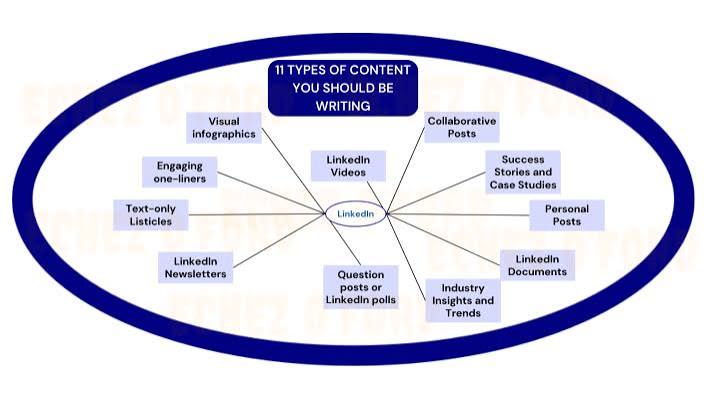
4. Use Different LinkedIn Content Formats
Publishing the same content format repeatedly can limit your creative options. Experiment with different formats to discover what your audience prefers.
What type of content gets the most engagement on LinkedIn?
Educational documents, multi-image posts, videos, and text posts can all perform well. Results depend on your audience, subject, and execution.
Socialinsider’s 2026 benchmark report, using its 2025 dataset of 2.45 million posts from 26,000 company pages, reported these average engagement rates:
| Content format | Average engagement rate |
| Native documents | 7.00% |
| Multi-image posts | 6.45% |
| Videos | 6.00% |
| Single images | 5.30% |
| Text posts | 4.50% |
| Polls | 4.20% |
| Link posts | 3.25% |
These figures represent one research dataset, not guaranteed results for every account.
Choose formats according to your content goals:
- Text posts: Share opinions, professional lessons, and industry discussions.
- Document posts: Publish checklists, educational guides, and step-by-step instructions.
- Images: Highlight projects, team activities, and useful infographics.
- Videos: Demonstrate products, explain processes, or share professional advice.
- Polls: Collect opinions about relevant industry questions.
For example, a marketing agency could publish a document titled “10 LinkedIn Profile Mistakes That Can Cost You Business Opportunities.”
Each slide could explain one mistake and provide a practical solution.
5. Ask Questions That Encourage Meaningful Comments
Questions can turn a simple post into an interesting professional discussion. However, they should connect directly with your topic.
Try asking:
- “What’s your biggest challenge when creating LinkedIn content?”
- “Which LinkedIn format works best for your business?”
- “How do you balance personal branding with company promotion?”
- “What’s one marketing lesson you learned from a failed campaign?”
Avoid generic questions that add no value. Instead, encourage readers to share specific experiences and professional opinions.
6. Share Personal Experiences and Professional Stories
Real experiences make professional advice more relatable. They also help distinguish your content from generic information repeated across social media.
Share lessons from completed projects, business challenges, and professional experiences.
A useful storytelling structure includes:
- Situation: Explain what happened.
- Challenge: Describe the problem.
- Action: Share the steps you took.
- Lesson: Explain what readers can learn.
For example, a consultant could explain how unclear communication affected a project and what changes improved the process.
Keep customer information confidential and use verified results whenever you discuss business outcomes.
7. Post Consistently With a Content Calendar
Consistency helps your audience understand what to expect from your profile or company page.
However, publishing every day isn’t necessary for everyone.
How often should you post on LinkedIn?
Start with two or three quality posts per week. Then adjust your schedule according to audience response and available resources.
A simple weekly schedule could look like this:
| Day | Content type | Purpose |
| Monday | Educational post | Share useful industry knowledge. |
| Wednesday | Professional experience | Build credibility and relationships. |
| Friday | Tips or document post | Encourage saves and shares. |
A content calendar also helps prevent repetitive topics. Plan educational content, customer stories, industry insights, and company updates in advance.
8. Use Relevant Hashtags and Keywords Naturally
Keywords help readers understand your content and its professional relevance.
For example, a post about LinkedIn marketing might naturally include:
- LinkedIn profile optimization
- Personal branding
- B2B lead generation
- LinkedIn content strategy
- Social media marketing
Relevant hashtags can provide additional topic context.
Examples include #LinkedInMarketing, #PersonalBranding, and #B2BMarketing.
Use hashtags selectively. Avoid unrelated popular hashtags simply to attract attention.
9. Engage With Other People’s LinkedIn Posts
Building engagement requires participating in other people’s conversations too.
Find relevant industry professionals and contribute useful comments to their posts.
Compare these examples:
Weak comment: “Great post! Thanks for sharing.”
More useful comment: “Your point about audience research is important. Many B2B companies focus on publishing more content without understanding customer concerns first.”
The second comment adds a professional perspective and encourages further discussion.
Make time to:
- Read posts from relevant professionals.
- Comment on discussions you understand.
- Answer questions within your expertise.
- Follow people who share useful information.
- Build relationships without immediately pitching services.
10. Respond to Comments on Your Posts
Publishing content is only the beginning. The discussions that follow can make your posts more valuable.
For example:
Reader: “Creating consistent LinkedIn content is difficult when managing a full-time business.”
Your response: “That’s a common challenge. Planning three content themes each week can make the process easier. Do you currently create posts in advance?”
This response acknowledges the concern and naturally continues the conversation.
Thank readers for useful contributions, answer questions clearly, and respect different opinions.
Avoid generic automated replies that make conversations feel impersonal.
11. Encourage Employee Advocacy
Employees can help company content reach relevant professional communities.
Their individual experiences often provide perspectives that corporate announcements cannot.
Encourage team members to share:
- Lessons from recent projects.
- Industry observations.
- Professional development experiences.
- Company achievements.
- Useful customer resources.
Keep participation authentic and voluntary. Employees should express their own ideas rather than copy identical promotional messages.
12. Share Customer Success Stories and Case Studies
Customer stories demonstrate how your services solve real problems.
Instead of simply claiming that your agency delivers excellent results, explain the work behind a completed project.
Use this structure:
| Section | Information to include |
| Background | Introduce the business or project. |
| Challenge | Explain the original problem. |
| Strategy | Describe the approach. |
| Results | Share verified outcomes. |
| Lessons | Explain what other businesses can learn. |
For example, a LinkedIn marketing agency could explain how it improved a client’s profile messaging and developed a consistent content strategy.
Use accurate figures and obtain permission before sharing identifiable customer information.
13. Tag Relevant People and Companies
Tagging can bring relevant participants into a professional conversation.
Mention collaborators, industry experts, and organizations when they genuinely contribute to your topic.
For example, if a designer helped complete a branding project, mentioning them acknowledges their contribution.
Avoid tagging unrelated people simply to attract attention. Unnecessary mentions can make your posts look promotional.
14. Experiment With Posting Times
Posting time can influence which audience members are available to see your content.
However, there isn’t one perfect time for every LinkedIn account.
Your audience might include professionals from Pakistan, the United States, and the United Kingdom. Their working schedules differ.
Test different time slots:
- Early morning.
- Mid-morning.
- Lunchtime.
- Early afternoon.
Compare similar posts across these time slots. Review impressions, comments, and engagement rates before changing your schedule.
If your target customers work in the United States, consider their time zone rather than automatically publishing according to your local schedule.
15. Build a Recognizable LinkedIn Content Series
A recurring content series gives readers a reason to recognize and revisit your posts.
Choose a subject connected to your expertise.
Examples include:
- Monday Marketing Lessons.
- Weekly LinkedIn Profile Tips.
- B2B Lead Generation Insights.
- Friday Business Growth Lessons.
- Common SEO Mistakes.
Keep the theme consistent while introducing fresh examples and practical advice.
For instance, a LinkedIn marketing agency could publish one profile optimization tip every Monday.
This creates a recognizable content theme and makes planning easier.
How to Create LinkedIn Posts That Generate More Engagement
Even a valuable idea can struggle if the post feels difficult to read. Clear formatting helps readers understand your message quickly.
Structure Your Posts for Easy Reading
LinkedIn users often browse their feeds between meetings or during short breaks.
Make your content easy to scan:
- Start with a relevant opening statement.
- Keep paragraphs short.
- Add line breaks between important ideas.
- Use bullet points for instructions.
- Highlight important phrases selectively.
- Remove unnecessary sentences.
For educational posts, follow this structure:
Opening: Introduce a problem.
Explanation: Explain why it happens.
Solution: Share practical steps.
Example: Show how the solution works.
Closing: Invite a relevant discussion.
Include Strong Calls to Action
A call to action tells readers what they can do next.
Examples include:
- “Which strategy would you try first?”
- “What has worked best for your team?”
- “Share your experience in the comments.”
- “Save this checklist for your next planning session.”
Avoid asking people to comment with meaningless words simply to increase engagement.
Use Examples to Make Your Content More Relatable
Specific examples make professional advice easier to apply.
For instance, instead of simply saying “Improve your LinkedIn headline,” show readers a practical comparison.
| Weak headline | Improved headline |
| Marketing Professional | B2B Marketing Strategist Helping Businesses Improve Lead Generation |
| Business Consultant | Business Consultant Helping Startups Build Growth Strategies |
| SEO Expert | SEO Specialist Helping Businesses Improve Organic Search Visibility |
The improved examples communicate expertise and explain professional value.
LinkedIn Personal Profile vs. Company Page: Which Gets More Engagement?
Personal profiles and company pages serve different purposes. Both can support business growth, but their content strategies should reflect their audiences.
How to Increase Engagement on a Personal LinkedIn Profile
A personal profile allows professionals to share their expertise, experiences, and opinions.
To improve personal profile engagement:
- Write a clear headline explaining your expertise.
- Share practical lessons from your work.
- Discuss industry trends and challenges.
- Participate in relevant professional discussions.
- Publish useful content consistently.
- Respond to comments thoughtfully.
For example, a business consultant can share lessons about leadership, sales growth, and business development.
How to Increase Engagement on a LinkedIn Company Page
Company pages should communicate brand expertise while highlighting the people behind the business.
Consider publishing:
- Company updates and announcements.
- Employee achievements.
- Customer success stories.
- Industry research and educational resources.
- Product demonstrations.
- Company culture and behind-the-scenes content.
Encourage employees to contribute their professional perspectives. Their participation can introduce company content to relevant networks.
Can Personal Profiles and Company Pages Work Together?
Yes. A coordinated strategy can make both channels more effective.
For example, a marketing agency could publish an educational post on its company page. A team member could share a related personal observation from their experience.
The content should complement each other rather than repeat identical promotional messages.
How to Measure and Track LinkedIn Engagement
Creating content without reviewing its performance makes improvement difficult.
LinkedIn analytics helps you understand which posts attract attention and encourage interactions.
Important LinkedIn Engagement Metrics to Monitor
| Metric | What it measures |
| Impressions | Number of times content appears on screens. |
| Members reached | Number of distinct members who saw content. |
| Reactions | Likes and other reactions. |
| Comments | Written responses from readers. |
| Reposts | Times people shared your content. |
| Saves | Times readers saved your posts. |
| Sends | Times members shared content privately. |
| Link clicks | Clicks on external links. |
| Profile visits | Visits to your professional profile. |
| New followers | Growth in your audience. |
LinkedIn provides individual post analytics for members and content analytics for company pages. Available metrics depend on the account and content type..
What Is a Good Engagement Rate on LinkedIn?
A good engagement rate depends on your audience size, industry, content format, and calculation method.
Socialinsider reported a 5.20% average engagement rate by impressions for LinkedIn company pages in its 2025 dataset.
However, that benchmark uses reactions, comments, and shares. LinkedIn’s company page analytics also includes clicks in its engagement-rate calculation.
Therefore, compare figures only when their formulas match.
Use this simple formula for engagement based on reactions, comments, and reposts:
Engagement Rate = (Total Engagements ÷ Impressions) × 100
For example, suppose your post receives:
- 5,000 impressions.
- 150 reactions.
- 25 comments.
- 15 reposts.
Your total engagement is 190.
Engagement rate:
(190 ÷ 5,000) × 100 = 3.8%
This is an illustrative calculation rather than a universal performance benchmark.
How to Track Performance Using LinkedIn Analytics
Follow these steps:
- Open your LinkedIn profile or company page.
- Navigate to the available analytics section.
- Open post or content analytics.
- Review impressions and engagement metrics.
- Identify your strongest-performing posts.
- Compare similar topics and formats.
- Record results in a spreadsheet.
- Use your findings to plan future content.
Look for patterns instead of judging individual posts.
For example, if educational document posts consistently attract more saves and comments, develop more practical guides.
Review performance weekly and compare trends monthly. This helps you make informed decisions without reacting to every small fluctuation.
Common LinkedIn Engagement Mistakes to Avoid
Sometimes the problem isn’t your posting frequency. It might be the way you approach content creation.
Posting Only Promotional Content
Constant advertising can make your profile feel like a sales brochure.
Balance promotional content with educational posts, professional experiences, and industry insights.
A possible content planning mix is:
- 50% educational content.
- 30% professional insights and experiences.
- 20% promotional content.
These percentages are a planning example, not a proven LinkedIn formula.
Publishing Without Understanding Your Audience
Generic posts rarely address specific professional problems.
Before publishing, ask:
- Who needs this information?
- What problem does it solve?
- Is the topic relevant to my industry?
- Can readers apply the advice?
Improve the topic if you cannot answer these questions.
Ignoring Comments and Messages
When people take time to respond, acknowledge their contributions.
Ignoring meaningful comments wastes opportunities to build professional relationships.
Make responding to relevant conversations part of your regular routine.
Using Irrelevant Hashtags and Tags
Unrelated hashtags and unnecessary mentions can make content look spammy.
Keep every hashtag and tag connected to the subject.
Posting Inconsistently
Publishing several posts in one week and disappearing the next month makes it harder to maintain a recognizable routine.
Choose a schedule you can realistically maintain.
Prioritizing Likes Over Meaningful Conversations
A large number of reactions doesn’t automatically mean your content attracts potential customers.
Pay attention to who interacts with your posts and what they discuss.
A relevant comment from a business decision-maker might be more valuable than dozens of unrelated likes.
Buying Engagement or Using Engagement Pods
Artificial engagement creates misleading performance signals.
LinkedIn has specifically stated that it is working against engagement pods, automated comments, and inauthentic interactions.
Focus on real discussions and genuine professional relationships instead.
How to Turn LinkedIn Engagement Into Business Opportunities
Engagement becomes more valuable when it supports a clear business objective.
For service providers, consultants, and B2B companies, LinkedIn can help start relationships with potential customers.
However, avoid treating every comment as a sales opportunity.
Build Relationships With Potential Clients
Identify professionals who regularly engage with topics related to your services.
For example, an SEO agency might connect with:
- Business owners.
- Marketing directors.
- E-commerce managers.
- Startup founders.
- Digital marketing professionals.
Participate in relevant discussions and share useful information.
Build familiarity before introducing a commercial offer.
Use Meaningful Conversations to Identify Leads
Comments can reveal problems that potential customers want to solve.
Suppose someone comments on your post:
“We’re struggling to generate qualified leads through LinkedIn.”
This creates an opportunity to offer a helpful suggestion.
Explain one practical improvement in the comments. If the person wants further guidance, continue the discussion professionally.
Avoid sending an aggressive sales pitch immediately.
Optimize Your LinkedIn Profile for Conversions
Your content may attract visitors, but your profile needs to explain what happens next.
Improve these important sections:
- Headline: Explain your professional expertise.
- About section: Describe who you help and how.
- Featured section: Showcase relevant work and useful resources.
- Experience: Explain your responsibilities and achievements.
- Contact information: Make it easy for relevant prospects to reach you.
A clear profile helps turn professional interest into meaningful business conversations.
Move Relevant Conversations Toward Business Discussions
Once someone expresses genuine interest, continue the discussion naturally.
A simple process looks like this:
Publish useful content → Attract relevant interactions → Build professional relationships → Identify business opportunities.
This approach connects content marketing with relationship-based lead generation.
Frequently Asked Questions About LinkedIn Engagement
How Can I Get More Engagement on LinkedIn?
Share useful content that addresses your audience’s professional interests. Write strong opening lines, experiment with different formats, and ask relevant questions.
Also, participate in industry discussions and respond to comments. Review analytics regularly to identify what works.
How Often Should I Post on LinkedIn?
Start with two or three quality posts per week. This gives you opportunities to maintain visibility without overwhelming your content creation process.
Adjust your schedule according to audience response and available resources.
What Type of Content Gets the Most Engagement on LinkedIn?
Educational document posts, multi-image content, videos, and useful text posts can attract meaningful interactions.
Socialinsider’s benchmark research found that native documents achieved a 7% average engagement rate in its 2025 dataset.
However, your results will depend on your audience and content quality.
Why Is My LinkedIn Engagement So Low?
Low engagement can happen for several reasons:
- Your topics don’t match audience interests.
- Your opening lines fail to attract attention.
- Your posts provide limited practical value.
- You publish inconsistently.
- Your content lacks a clear focus.
- You don’t participate in professional discussions.
- Your profile attracts the wrong audience.
Review your last 10–15 posts and identify recurring patterns. Examine comments, impressions, saves, and audience relevance instead of focusing only on likes.
How Can I Make My LinkedIn Posts More Engaging?
Start with a specific topic and a strong opening statement. Keep paragraphs readable and provide useful information.
Include examples, practical advice, and relevant questions. Use images or document posts when they improve your explanation.
Most importantly, give readers a genuine reason to participate.
Are LinkedIn Hashtags Still Useful?
Relevant hashtags can help communicate a post’s subject. However, they aren’t a guaranteed way to increase visibility.
Use a few closely related hashtags when appropriate. Focus more on topic relevance and content quality.
Does Commenting on Other LinkedIn Posts Increase Engagement?
Commenting helps you participate in professional conversations and build relationships.
Thoughtful comments can introduce your expertise to other readers. However, generic comments and automated interactions offer little value.
How Long Does It Take to Increase LinkedIn Engagement?
There isn’t a fixed timeline for improving engagement.
Results depend on your existing audience, content quality, posting consistency, and industry.
Review performance over several weeks and improve your strategy using actual data rather than expecting immediate results.
Final Thoughts: Build a LinkedIn Engagement Strategy That Lasts
Getting more LinkedIn engagement isn’t about chasing likes or posting every day. It’s about sharing useful ideas and building genuine professional relationships.
Start by understanding your audience. Then create valuable content, experiment with different formats, and participate in meaningful discussions.
Track your results to understand what attracts the right people. Improve your approach whenever your analytics reveal an opportunity.
Most importantly, focus on engagement quality rather than engagement quantity. A smaller audience that regularly reads, discusses, and shares your expertise can create stronger professional opportunities.
With a consistent LinkedIn engagement strategy, you can improve content performance, strengthen your personal brand, and create more opportunities for business growth.
Key Takeaways
- Understand your audience before creating content.
- Write strong and relevant opening lines.
- Share educational posts, experiences, and practical insights.
- Experiment with documents, images, videos, and text posts.
- Ask questions that encourage genuine discussions.
- Comment on relevant posts and respond to readers.
- Maintain a realistic publishing schedule.
- Track engagement rates and meaningful metrics.
- Avoid artificial engagement and repetitive promotional content.
- Turn relevant interactions into professional relationships.
Recommended Sources for Further Reading
- LinkedIn: Improving the Feed in 2026 — Updates about AI-powered recommendations and authentic engagement.
- LinkedIn: Post Analytics — Official information about post performance metrics.
- LinkedIn: Company Page Content Analytics — Metrics and reporting information for company pages.