
LinkedIn Follow vs Connect: What’s the Difference and Which Should You Choose?
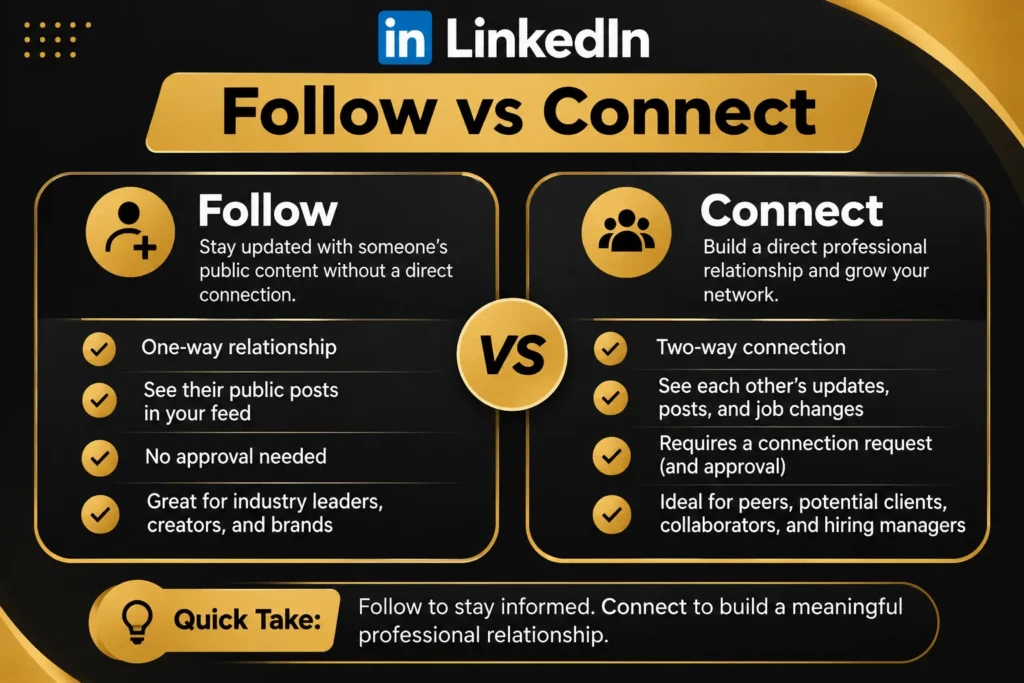
LinkedIn offers two ways to interact with professionals: Follow and Connect. Although both help you build your professional network, they serve different purposes. Following someone lets you see their content without becoming a first-degree connection. Connecting creates a mutual professional relationship and generally allows direct messaging.
Understanding LinkedIn Follow vs Connect helps you choose the right approach for networking, personal branding, and business growth. For example, you can follow an industry expert to learn from their posts. However, you might connect with a potential client to build a professional relationship.
Both options have value. The right choice depends on your goals and how you want to interact with other professionals.
What Is the Difference Between Following and Connecting on LinkedIn?
LinkedIn uses following and connecting to help members build professional relationships. However, each option offers a different level of interaction.
What Does Following Someone on LinkedIn Mean?
Following someone on LinkedIn means you want to see their posts and updates without becoming their first-degree connection.
When you follow a person, their eligible content may appear in your LinkedIn feed. You don’t need to send a connection request or wait for approval.
For example, suppose you’re interested in digital marketing. You find an experienced SEO consultant who regularly shares useful optimization tips. You can follow that person to learn from their content without establishing a direct professional relationship.
Benefits of following someone include:
- Keeping up with industry experts and thought leaders.
- Learning about professional trends and developments.
- Engaging with relevant posts and discussions.
- Following potential clients and business leaders.
- Growing your professional knowledge without sending invitations.
Following works best when you want to consume someone’s content rather than communicate directly.
What Does Connecting With Someone on LinkedIn Mean?
Connecting on LinkedIn creates a mutual professional relationship between two members.
When someone accepts your connection request, you both become first-degree connections. This generally allows direct messaging and provides greater access to each other’s professional profiles, depending on privacy settings.
For example, if you meet a business owner at a networking event, you can send them a connection invitation to stay in touch.
Benefits of connecting include:
- Building direct professional relationships.
- Communicating through LinkedIn messages.
- Expanding your professional network.
- Discovering business and career opportunities.
- Developing relationships with clients and collaborators.
LinkedIn recommends connecting with people you know and trust professionally.
LinkedIn Follow vs Connect: Key Differences Compared
The Difference between Follow and Connect on LinkedIn becomes easier to understand when you compare their features.
| Feature | Follow | Connect |
| Relationship | One-way | Mutual |
| First-degree connection | No | Yes |
| See eligible posts | Yes | Yes |
| Direct messaging | Not automatically | Generally available |
| Approval required | Usually no | Yes |
| Automatic following | No mutual relationship | Both members follow each other |
| Professional networking | Indirect engagement | Direct relationship building |
One-Way Following vs. Mutual Connections
Following creates a one-way relationship. You choose to receive someone’s updates, but they don’t automatically follow your content.
Connecting works differently. Both members agree to establish a professional relationship.
Once someone accepts your invitation, you become first-degree connections. LinkedIn automatically makes connections followers of each other.
Messaging and Communication Access
Messaging is another important difference.
First-degree connections can generally message each other directly. This makes connecting useful when you want to discuss projects, business opportunities, or professional interests.
Following someone doesn’t automatically provide direct messaging access. However, LinkedIn offers InMail and other messaging options for eligible accounts.
Posts, Updates, and Feed Visibility
Following lets you receive someone’s eligible posts and articles in your feed.
Connecting also provides access to each other’s eligible updates because first-degree connections automatically follow each other.
However, LinkedIn doesn’t guarantee that every post will appear in your feed. Its feed ranking system determines which updates you see.
Notifications and Privacy Differences
People can see when you follow them. LinkedIn may also notify someone when a non-connection starts following them.
However, you can manage your following visibility through Settings & Privacy → Visibility → Follow visibility.
You can choose whether other members can see the people you follow. Remember that the person you follow can still see that you’re following them.
LinkedIn Followers vs. Connections: Which Is Better?
Neither option is automatically better. Your professional goals determine which one offers more value.
Benefits of Having More LinkedIn Followers
Followers help you build an audience around your knowledge and professional expertise.
When people follow your profile, they can receive your eligible posts in their feeds. This gives your content opportunities to reach professionals beyond your immediate network.
For example, a marketing consultant can share content about SEO, personal branding, and lead generation to attract interested followers.
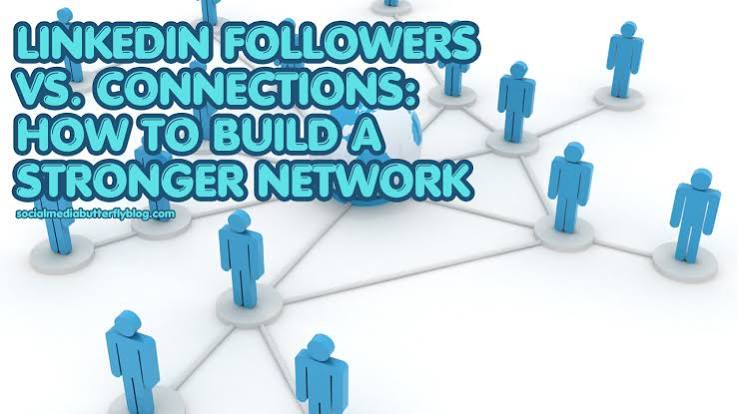
Main benefits include:
- Greater potential content visibility.
- Opportunities to strengthen personal branding.
- A growing audience interested in your expertise.
- More opportunities for relevant engagement.
However, follower numbers alone don’t prove professional influence. A smaller audience with genuine interest can be more valuable than thousands of unrelated followers.
Benefits of Building More LinkedIn Connections
Connections help you develop direct professional relationships.
For example, a freelance web developer might connect with business owners, marketing managers, agency founders, and potential collaborators.
These relationships can create opportunities for referrals, partnerships, and future projects.
Main benefits include:
- Direct professional communication.
- Opportunities for collaboration.
- Stronger business relationships.
- Access to a wider professional network.
- Better opportunities to maintain client relationships.
Followers vs. Connections for Personal Branding
Personal branding requires visibility and trust. Followers help people discover your content, while connections help you develop professional relationships.
A leadership consultant, for example, might attract followers by publishing useful management advice. Their connections may include former clients, colleagues, business partners, and industry professionals.
Both groups support professional growth.
What Happens When You Follow or Connect With Someone on LinkedIn?
Understanding what happens after clicking either button helps you use LinkedIn more effectively.
Do LinkedIn Connections Automatically Become Followers?
Yes. LinkedIn automatically makes first-degree connections followers of each other.
When someone accepts your connection request, both members automatically follow each other’s updates.
However, either person can unfollow the other without removing the connection.
For example, you might connect with a former colleague but later decide their posts aren’t relevant to your interests. You can unfollow them while keeping the professional relationship.
Can You Unfollow Someone Without Removing Them as a Connection?
Yes. LinkedIn allows you to unfollow someone without disconnecting.
To do this:
- Open the person’s LinkedIn profile.
- Find the Following option.
- Click it to unfollow the person.
- Confirm if LinkedIn requests confirmation.
You can also select the three-dot menu on one of their posts and choose Unfollow.
The person won’t receive a notification when you unfollow them. Your connection remains intact.
Can Someone See When You Follow Them on LinkedIn?
Yes. The person you follow can see that you’re following them. They may also receive a notification when a non-connection starts following them.
You can control how other members see your following activity through LinkedIn’s privacy settings. However, this doesn’t hide your follow relationship from the person you’re following.
How to Follow Someone on LinkedIn Without Connecting
Following someone without connecting is simple.
Follow these steps:
- Log in to your LinkedIn account.
- Search for the person you want to follow.
- Open their profile.
- Click the Follow button.
- Check whether the button changes to Following.
Their eligible posts may now appear in your feed.
If Follow isn’t visible, click More in their profile introduction section. You may find the Follow option in the dropdown menu.
This approach works well when you want to learn from industry experts, recruiters, potential clients, and business leaders.
How to Connect With Someone on LinkedIn
Connecting is useful when you have a genuine reason to establish a professional relationship.
Follow these steps:
- Search for the person on LinkedIn.
- Open their profile.
- Click Connect.
- Add a personalized message when available.
- Review your invitation.
- Click Send.
How to Write a Personalized LinkedIn Connection Request
A personalized invitation gives the recipient a reason to accept your request.
For example:
For a potential client:
“Hi Sarah, I enjoyed your recent post about business growth. I work in digital marketing and would love to connect.”
For an industry professional:
“Hi James, I appreciate your insights on LinkedIn marketing. I’d be glad to connect and follow your work.”
Keep your message short, relevant, and professional. Avoid immediately promoting your services.
Why Does LinkedIn Show Follow Instead of Connect?
Sometimes LinkedIn displays Follow as the primary profile button instead of Connect.
This happens when a member chooses Follow as their primary profile action. Content creators, business leaders, and industry experts often use this setting to attract followers.
However, you can usually find the Connect option under the More menu.
How to Change Your LinkedIn Primary Action
If you want visitors to see Connect first, update your profile settings:
- Open LinkedIn.
- Click your profile picture.
- Select Settings & Privacy.
- Open Visibility.
- Find Followers under Visibility of your LinkedIn activity.
- Locate Make Follow Primary.
- Turn off the option to display Connect as your primary action.
If you want to attract more followers, turn the setting on instead.
LinkedIn also lets you choose who can follow your updates. You can allow everyone on LinkedIn or restrict followers to your first-degree connections.
How to Get More LinkedIn Followers and Connections
Growing your LinkedIn audience requires a clear profile, valuable content, and meaningful engagement.
How to Get More Followers on LinkedIn
People follow professionals when they regularly share useful information.
If you’re a marketing consultant, consider publishing content about:
- LinkedIn profile optimization.
- Personal branding strategies.
- SEO and content marketing.
- B2B lead generation.
- Professional networking.
Also, optimize your profile to communicate your expertise clearly.
Use a professional photo, relevant headline, informative About section, and useful Featured content.
How to Get More LinkedIn Connections
Start by identifying professionals who match your career or business goals.
Follow these practical steps:
- Search for relevant professionals.
- Review their profiles before reaching out.
- Identify shared interests or experiences.
- Send personalized connection invitations.
- Engage with their content naturally.
- Continue conversations when appropriate.
Avoid sending random invitations or using aggressive automation. LinkedIn may restrict accounts that send excessive unwanted requests.
Should You Follow or Connect With Potential Clients on LinkedIn?
If you use LinkedIn for B2B lead generation, both options can support your strategy.
Follow first when you want to understand a prospect’s interests, business activities, and professional challenges.
Connect when you have a genuine reason to establish direct communication.
For example, a digital marketing agency might follow a business owner who regularly discusses company growth. The agency can engage with relevant posts and learn about the owner’s interests.
Later, it may send a personalized connection invitation.
This approach creates a more natural introduction than sending an immediate sales pitch.
Final Thoughts
Understanding LinkedIn Follow vs Connect helps you build a stronger professional presence.
Following allows you to learn from industry experts, discover useful content, and grow your audience. Connecting helps you develop professional relationships, communicate directly, and create business opportunities.
If your goal is personal branding, focus on attracting relevant followers through valuable content. If you want stronger professional relationships, prioritize meaningful connections.
For business growth, combine both approaches thoughtfully. Focus solutions on building relationships with the right people rather than collecting numbers
Frequently Asked Questions
Is it better to follow or connect on LinkedIn?
Following is better when you want to see someone’s content without establishing a direct relationship. Connecting is better when you want to communicate and build professional relationships.
Does following someone send a connection request?
No. Following someone doesn’t send a connection request. You must select Connect separately to establish a first-degree relationship.
Can you connect with someone after following them?
Yes. You can follow someone first and send a connection invitation later. If they accept, you become first-degree connections.
Can you message someone you follow but aren’t connected with?
Not automatically. Direct messaging generally requires a connection, although InMail and other messaging options may be available depending on account features and settings.
Does following someone increase your LinkedIn connections?
No. Following someone increases neither your connection count nor their first-degree network. Only accepted connection invitations create first-degree connections.
Is there a limit to LinkedIn connections?
Yes. LinkedIn allows members to have up to 30,000 first-degree connections. Following people who aren’t connections has a separate limit.