
How to Find a Hiring Manager on LinkedIn: 7 Easy Methods
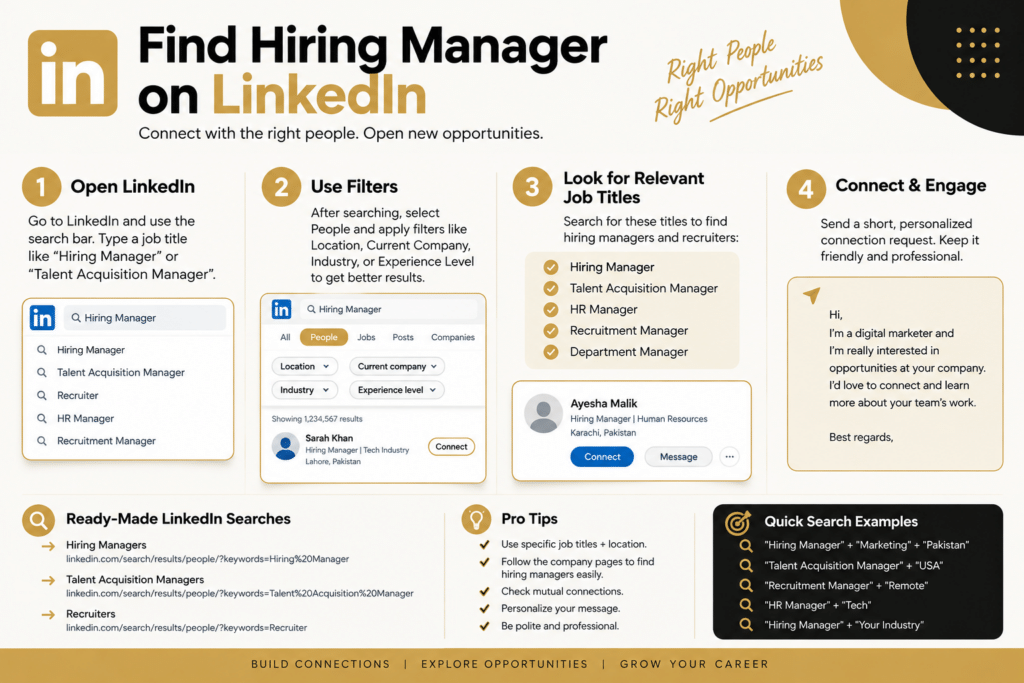
Finding a hiring manager on LinkedIn can help you connect with the right person during your job search. Instead of messaging random employees, you can identify the manager responsible for your target role and introduce yourself professionally.
To find a hiring manager, start with the job posting, search the company’s employees, and check relevant job titles. You can also use Boolean search, hiring announcements, and public company information.
This guide explains how to find a hiring manager on LinkedIn, verify the right contact, and write a message that shows genuine interest.
Key Takeaways
- Check the job posting for hiring-team information.
- Use LinkedIn search by company to find relevant managers.
- Search related job titles because titles vary between organizations.
- Verify the person’s responsibilities before contacting them.
- Personalize your message and follow the official application process.
What Is a Hiring Manager?
A hiring manager is usually responsible for filling a position within their team. They understand the role’s responsibilities, required skills, and team goals.
A recruiter typically manages candidate sourcing, screening, and hiring coordination. A talent acquisition specialist may perform similar duties.
| Role | Main responsibility |
| Hiring manager | Evaluates candidates and team requirements |
| Recruiter | Manages recruitment and candidate screening |
| Talent acquisition specialist | Supports candidate sourcing and hiring |
| Department head | Oversees a department and may supervise hiring managers |
For example, a content writer position might report to a Content Marketing Manager. A recruiter may coordinate interviews while the manager evaluates writing skills.
How to Find a Hiring Manager on LinkedIn
Check the LinkedIn Job Posting
Start with the original job posting. Some listings include a Meet the Hiring Team section or identify the recruiter who published the vacancy.
- Open the job posting.
- Review its description and team details.
- Check for a listed recruiter or hiring manager.
- Open their profile and verify their current role.
Remember that the job poster isn’t always the hiring manager. They may simply handle recruitment.
Use LinkedIn Search by Company
Visit the LinkedIn company’s page and look for its employee list. Search for titles related to your target position.
For example, if you’re applying for an SEO specialist role, search for:
- SEO Manager
- Head of SEO
- Organic Growth Manager
- Digital Marketing Manager
Compare each person’s responsibilities with the job description. Don’t assume every senior employee makes hiring decisions.
Search for Relevant Job Titles
Use LinkedIn’s main search bar to search for a company and relevant job titles. Select the People filter when available.
Examples include:
- Marketing Manager at Company Name
- Engineering Manager Company Name
- Head of Content Company Name
Try related titles if your first search produces limited results. A manager responsible for your target role may have a different title than expected.
Use Boolean Search
Boolean search can narrow results using terms such as AND, OR, and quotation marks in supported LinkedIn search experiences.
| Search example | Purpose |
| “Marketing Manager” AND “Company Name” | Find profiles matching both terms |
| “Head of Content” OR “Content Director” | Search for alternative titles |
| “Engineering Manager” AND “Company Name” | Narrow results to engineering leadership |
Replace the example terms with your target company and role. Search results aren’t proof that someone manages the vacancy, so verify each profile.
Search Hiring Announcements
Search LinkedIn posts using the company name, job title, or phrases such as “We’re hiring.”
A department manager may announce an opening directly. A recruiter may share the same vacancy and provide application details.
Check whether the post refers to your specific role before contacting the author.
Review Current Team Members
If you can’t identify the manager, look at employees who work in the same department. Their profiles may reveal team structures or leadership relationships.
You can also ask a relevant employee who manages the role. Keep your question polite and avoid requesting a referral immediately.
Check the Company’s Website
Some companies publish leadership information or reporting details on their websites developing. Review the careers page, team directory, and original job description.
If the posting says the role reports to a Director of Marketing, search that title on LinkedIn. This provides a stronger starting point than guessing.
How to Identify the Right Hiring Manager
Finding someone with a suitable title isn’t enough. Confirm that their responsibilities match the job you’re targeting.
Check these details:
- Current company: Make sure they still work there.
- Department: Their team should relate to the vacancy.
- Job responsibilities: Look for evidence that they lead relevant work.
- Hiring involvement: Check whether the job posting or public announcements connect them to recruitment.
If several people seem relevant, prioritize the person whose responsibilities most closely match the position.
What If You Can’t Find the Hiring Manager?
Sometimes, companies don’t share enough information to identify the hiring manager. You can still move forward with your application.
Try these options:
- Search alternative job titles.
- Contact the recruiter listed on the job posting.
- Ask a relevant employee who manages the role.
- Review the company’s official careers page.
- Submit your application through the employer’s required process.
Don’t spend so much time searching that you miss the application deadline.
How to Contact a Hiring Manager on LinkedIn
Once you find the right person, send a short, personalized message. Explain why you’re reaching out and connect your experience to the role.
How to Write a LinkedIn Message to a Hiring Manager
Follow this simple structure:
- Mention the specific job or team.
- Introduce one relevant skill or experience.
- Explain why you’re interested.
- End with a polite, low-pressure request.
Here’s a connection request example:
Hi [Name], I noticed the [Job Title] opening at [Company]. My experience in [Relevant Skill] aligns with the role, and I’d be glad to connect and learn more about your team.
What to Say When Messaging a Hiring Manager on LinkedIn
If you’ve already applied, try this message:
Hi [Name], I recently applied for the [Job Title] position at [Company]. My experience in [Relevant Skill] relates closely to the role. I’m interested in your team’s work and wanted to introduce myself. Thank you for your time.
Personalize the message before sending it. Avoid generic requests or asking for a referral immediately.
How to Follow Up Professionally
If the person doesn’t respond, allow reasonable time before sending one brief follow-up.
Hi [Name], I’m following up on my message about the [Job Title] position. I’m still interested in the opportunity and would appreciate any guidance you can share. Thanks for your time.
If they don’t reply after your follow-up, move on. Repeated messages can feel intrusive.
Should You Contact the Hiring Manager or Recruiter First?
Your choice depends on the information you need.
| Situation | Who to contact |
| You have questions about application requirements | Recruiter |
| You want to understand the team’s responsibilities | Hiring manager |
| The job posting lists a recruiter | Recruiter |
| You can’t identify the hiring manager | Recruiter or relevant employee |
| The employer requires applications through its careers page | Follow the official process |
A recruiter can often explain the hiring process, while a hiring manager may understand the team’s day-to-day needs. Their responsibilities can overlap, so choose the most relevant contact.
Improve Your LinkedIn Profile Before Reaching Out
A hiring manager may visit your profile after receiving your message. Make sure it clearly communicates your experience and professional focus.
- Headline: Describe your role, specialty, or relevant skills.
- About section: Summarize your experience and career interests.
- Experience: Keep your responsibilities and achievements accurate.
- Skills: Highlight abilities related to your target position.
- Featured section: Add relevant projects or portfolio samples.
If you’re a beginner, include relevant coursework or personal projects. Clearly distinguish these from paid professional experience.
LinkedIn Job Search Tips for Better Results
Use a simple tracking sheet to organize your search. Record company names, job postings, potential hiring managers, and application dates.
Before contacting someone, check that you’ve:
- Read the complete job description.
- Verified the person’s current role.
- Identified a genuine reason to connect.
- Personalized your message.
- Followed the employer’s application instructions.
These LinkedIn job search tips help you stay organized without sending unnecessary messages.
Final Thoughts
Finding the right hiring manager on LinkedIn starts with researching the company and understanding the role. Use relevant job titles, verify each contact, and personalize your outreach.
Most importantly, combine professional networking with a strong job application. A thoughtful message may open a conversation, but your relevant skills and experience remain essential.
Frequently Asked Questions
How do I find a hiring manager for a specific job on LinkedIn?
Check the job posting, search the company’s employees, and look for managers whose responsibilities match the role. Verify their profiles before reaching out.
Can I find a hiring manager without LinkedIn Premium?
Yes. Standard search, company employee lists, public profiles, and job postings can help you identify relevant contacts. Some advanced filters require Premium.
Is it appropriate to contact a hiring manager before applying?
Yes, when the employer hasn’t specified otherwise. Keep your message professional and follow the official application process.
What if the hiring manager doesn’t respond?
You can send one polite follow-up after allowing reasonable time. If they still don’t respond, focus on other opportunities.
How many times should I message a hiring manager?
Start with one personalized message and consider one follow-up. Avoid repeated messages if the person doesn’t respond.